
DMX512 ArtNET
LEDVIZ supports DMX512 over ArtNET. This lets an ARKAOS system, for example, control LEDVIZ remotely and synchronise it with other elements of a show.
Lighting systems use DMX to transmit values such as brightness, colour and spotlight positions. Together with an LED perimeter display, it can coordinate the playback of a show programme.
Prepare the network
Section titled “Prepare the network”Use a separate network: The existing LEDVIZ documentation recommends a separate network because DMX512 commands are sent at a high frequency. An additional USB-to-Ethernet adapter is one possible solution. This prevents control traffic from interfering with other network use.
UDP port 6454 must be open in the firewall for reception. The data must be able to reach the LEDVIZ computer.
Configure the universe and start channel
Section titled “Configure the universe and start channel”Open the settings dialog from Steuerung (Control) in the menu bar.
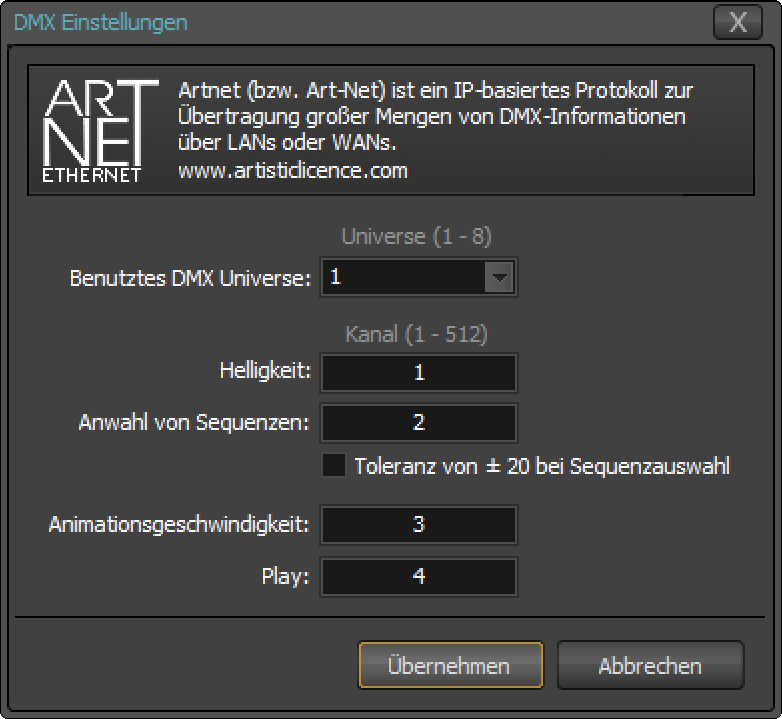
A DMX universe is a list identified by an ID and containing 512 channel values. Each value ranges from 0 to 255.
LEDVIZ uses four consecutive channels. Specify the first one as the start channel:
| Channel relative to the start channel | Function |
|---|---|
| Channel + 0 | Brightness |
| Channel + 1 | Sequence ID |
| Channel + 2 | Animation speed |
| Channel + 3 | Play trigger: a value of 255 triggers Play |
Trigger Play again: LEDVIZ triggers the Play command only after receiving a value below 255. Holding the value at 255 does not trigger Play again.
Enable DMX control
Section titled “Enable DMX control”Enable monitoring of incoming DMX commands in the Steuerung (Control) menu. Commands are processed only while this monitoring is active.
A blue bar above the playlist indicates that DMX monitoring is active:

The DMX512 icon at the top right flashes when commands arrive. If it stays grey, LEDVIZ is not detecting DMX commands.
Check reception
Section titled “Check reception”If no commands arrive, check that the LEDVIZ computer is receiving the data and that UDP 6454 is allowed through the firewall. Also check the blue bar to confirm that DMX monitoring is active.
This reference is based on the existing LEDVIZ documentation. Some screenshots show an earlier application interface. Original documentation